EDL Forced Download Mode
The Rhino Pi IQ9N (Rhino Pi IQ9N) is based on the Qualcomm IQ9075 platform. When the system fails to boot normally, you can enter EDL (Emergency Download) mode to perform forced flashing.
Two boot mode select signals are brought out on the board: FORCE_BOOT_M and FORCE_BOOT_S, corresponding to the CPU BOOT button and the RTSS BOOT button respectively. Entering EDL mode uses the RTSS BOOT button (FORCE_BOOT_S).
Related Interfaces
For the positions of the RTSS BOOT button and the debug/functional UARTs on the board, see the interface layout diagram in Rhino Pi IQ9N Interface Description on the first page.
| Interface/Button | Description |
|---|---|
| RTSS BOOT button | Corresponds to signal FORCE_BOOT_S; press and hold it, then power on to enter EDL (forced download) mode |
| CPU BOOT button | Corresponds to signal FORCE_BOOT_M; CPU subsystem boot mode selection |
| CPU-DBG | CPU debug UART, WAFER-GH1.25-4PLB, 3.3V level |
| CPU-UART | CPU functional UART, WAFER-GH1.25-4PLB, 3.3V level |
| RTSS-DBG | RTSS debug UART, WAFER-GH1.25-4PLB, 3.3V level |
| RTSS-UART | RTSS functional UART, WAFER-GH1.25-4PLB, 3.3V level |
UART Interface Definitions
The debug and functional UARTs all use WAFER-GH1.25-4PLB connectors:
| Pin | Signal | Description |
|---|---|---|
| 1 | VCC_3VS | 3.3V power |
| 2 | UART_TX | UART transmit |
| 3 | UART_RX | UART receive |
| 4 | GND | Ground |
Use Cases
The device can be recovered through EDL mode in the following situations:
- The system image is corrupted and the device cannot boot normally
- The complete firmware needs to be re-flashed
- A failed upgrade has bricked the device
Procedure
For the complete entry method and flashing process, see Ubuntu System Installation. The brief steps are as follows:
Use a USB TYPE-A to TYPE-C data cable to connect the computer to the device, and run
adb devicesto confirm the device is recognized.Run
adb root; adb shell reboot edlto enter EDL mode; if the system cannot boot, disconnect the device power, press and hold theRTSS BOOTbutton, then press the power button to power on; the device enters EDL mode and the button can then be released.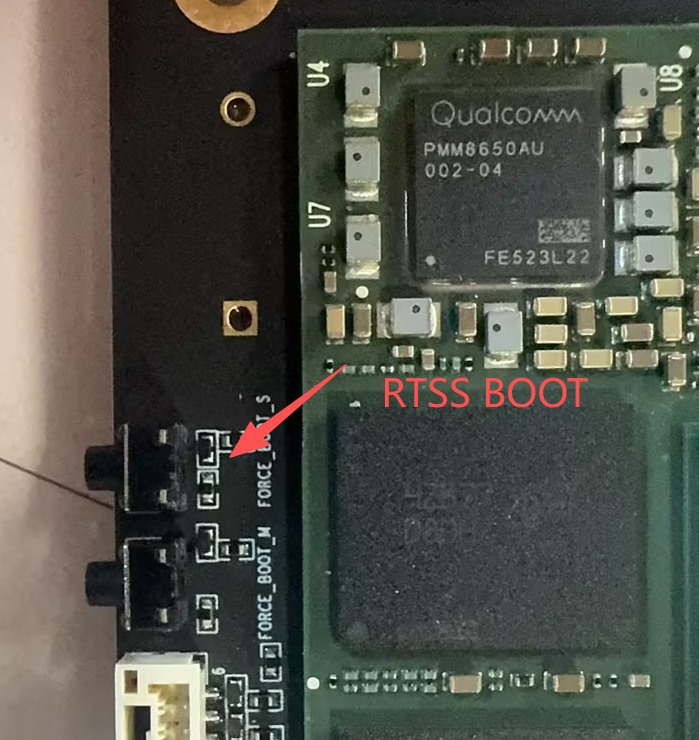
In QFIL, configure
Configuration; in the port list selectQualcomm HS-USB QDLoader 9008 (COMx), setSelect Build TypetoFlat Build, and loadprog_firehose_ddr.elfand the XML files from the ROM package.Click
Downloadto start flashing, and wait for theDownload Succeedmessage; the device then reboots automatically.
Note
For the complete flashing order and every QFIL setting, refer to Ubuntu System Installation. This page only describes how to enter EDL mode.
Notes
- Entering EDL mode requires a USB connection and dedicated flashing tools; use the tools and firmware packages provided by the manufacturer.
- Do not power off or unplug cables during flashing, as this may leave the device unrecoverable.
- The UART interfaces are at 3.3V level; do not connect 5V serial devices directly, to avoid damaging the chip.