Buttons
The Rhino Pi IQ9N (Rhino Pi IQ9N) has an onboard power button and Boot buttons.
Button List
| Button | Quantity | Description |
|---|---|---|
| Power Button & System LED | 1 | Illuminated button combining power switch and status indication |
| Boot Buttons | 2 | CPU BOOT x1, RTSS BOOT x1 |
Function Description
Power Button
The power button is an illuminated button used to power the device on and off, and it also indicates the system operating status via the light.
Boot Buttons
CPU BOOT and RTSS BOOT are used to select the boot mode of the CPU and RTSS subsystems respectively, corresponding to the board-level boot mode select signals FORCE_BOOT_M (CPU BOOT) and FORCE_BOOT_S (RTSS BOOT). Together with the debug UART they can be used for download and debugging. RTSS BOOT is the button used to enter EDL (forced download) mode.
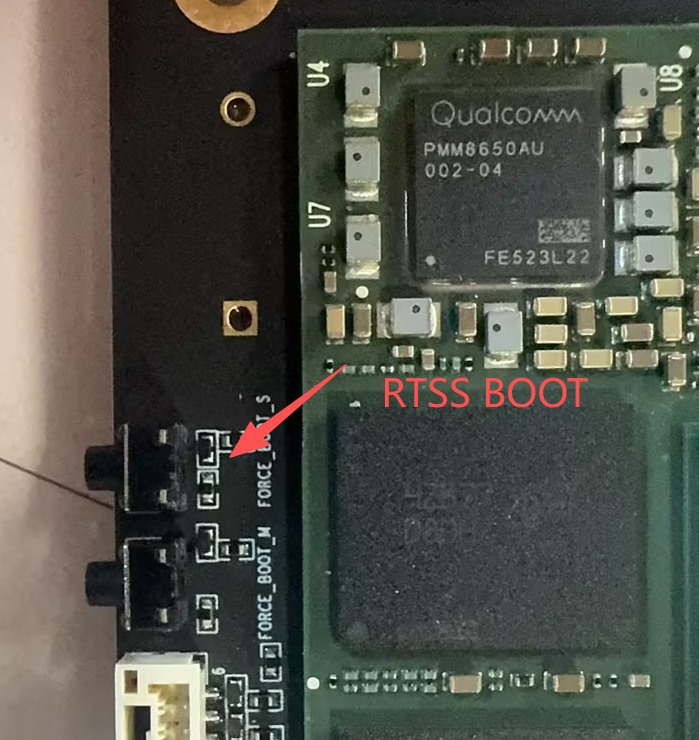
To enter EDL (forced download) mode, press and hold the RTSS BOOT button, then press the power button to power on; the device enters that mode and the button can then be released. See EDL Forced Download Mode for details.
Notes
- Do not frequently press and hold the power button to force a power-off while the system is running, as this may corrupt stored data.
- Before entering Boot mode, make sure the corresponding debug UART is connected so that the boot log can be observed.