Temperature and Humidity Sensor
Sonbus SM7820B
- Official Kit Documentation: Sonbus SM7820B
Preparation
- Rhino Pi X1
- Sonbus SM7820B Temperature and Humidity Sensor
- USB-to-RS485 adapter board
- Several Dupont wires
Hardware Connection
Since the A8550PF1 has no directly exposed RS485 pins, a USB-to-RS485 adapter board is required for use.
- Identify the USB-to-RS485 device:
shellls -l /dev/ttyU*

Connect A+ and B- of the USB-to-RS485 adapter board to pins A and B of the temperature sensor respectively.
Connect PIN2 and PIN6 (Raspberry Pi side) of Rhino Pi X1 to the VCC and GND pins of the temperature and humidity sensor respectively.
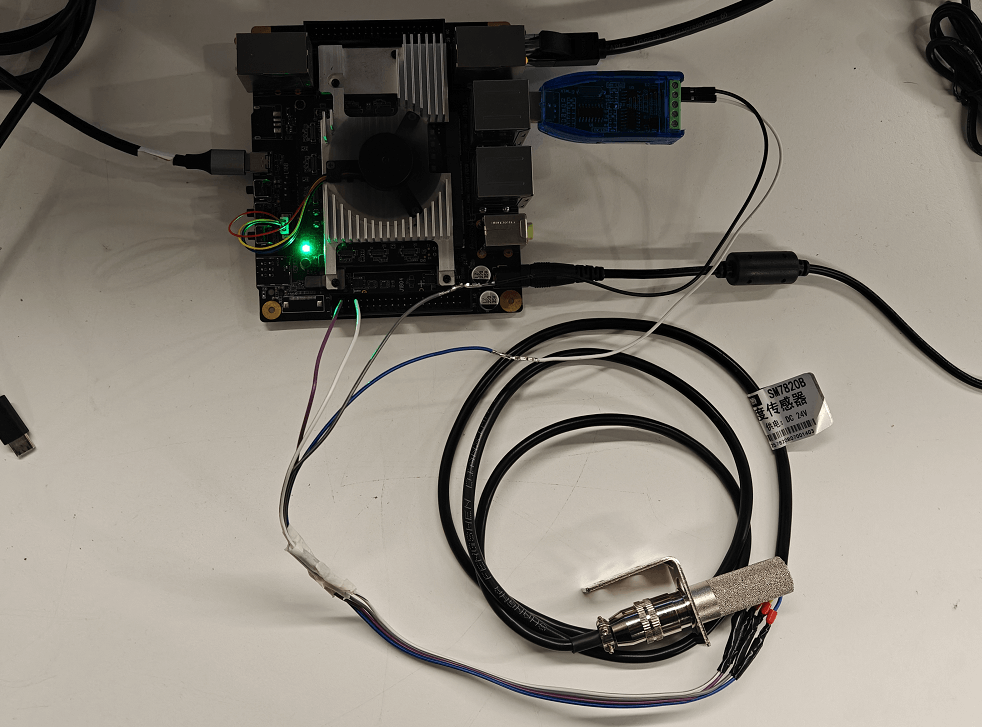
Testing
The Sonbus temperature and humidity sensor requires a manual measurement command to be sent to return a reading—one command sent yields one result.
- Since the minicom testing tool cannot send hexadecimal data to control the sensor for measurement, a script can be written to convert the data format and send it to the serial port device. The script content is as follows:
#!/bin/bash
# Check the number of parameters
if [ "$#" -ne 2 ]; then
    echo "Usage: $0 [Serial Port Device] [Hexadecimal Data]"
    exit 1
fi
# Serial port device, e.g., /dev/ttyS2
SERIAL_PORT=$1

# Hexadecimal data, e.g., '1F2E3D4C'
HEX_DATA=$2

# Convert hexadecimal data to binary stream and send to the serial port
printf "$HEX_DATA" | xxd -r -p > $SERIAL_PORT- Send the control command using the script:
sudo ./send_hex.sh /dev/ttyHS1 '010300000002C40B'
./send_hex.sh /dev/ttyUSB0 '010300000002C40B'/dev/ttyHS1: RS485 device number of Rhino Pi X1010300000002C40B: Command to read temperature and humidity measurement data. For other commands (e.g., baud rate modification), refer to the Sonbus product manual.
- Receive data using the minicom tool in AidLux (install it first if not present:
sudo apt update; apt install minicom).
Open minicom: sudo minicom -D /dev/ttyHS1 -b 9600 -H
sudo minicom -D /dev/ttyUSB0 -b 9600 -H/dev/ttyUSB0: Device number of the USB-to-RS485 adapter board-b 9600: Set the baud rate to 9600 (default baud rate of the sensor)-H: Display data in hexadecimal format

Result Analysis
After sending a query frame command to the temperature and humidity sensor, a response frame will be returned: 01 03 04 09 0d 16 8f 27 a8.
The response format is shown in the figure below:

Among the returned data, Data 1 represents temperature and Data 2 represents humidity. Using the calculation method provided in the Sonbus SM7820B manual (taking temperature calculation as an example):
- Convert the hexadecimal value
0a e4to decimal: 2317. - The data scaling factor is 100, so the actual temperature is calculated as 2317 / 100 = 23.17 °C, meaning the current indoor temperature is 23.17 °C.