Model Farm User Guide
Introduction
To help developers speed up performance evaluation of AI models on target edge hardware platforms, APLUX has built the Model Farm platform. The Model Farm contains hundreds of mainstream open-source models covering different functions, adapted and optimized for different hardware platforms, and provides tested benchmark performance metrics as a reference. Developers can quickly complete evaluations according to their actual requirements without investing significant cost or waiting for long periods.
In addition, the Model Farm provides runnable model inference example code, greatly reducing the difficulty and workload for developers when testing model performance on existing hardware devices and developing AI feature code. This shortens the entire process time and accelerates the delivery of solutions.
Features
Specifically, the Model Farm helps developers accomplish the following:
- Query the AI performance of a specified AI model on specified Qualcomm hardware
- Download adapted and optimized AI models (the NPU hardware computing unit can be invoked for inference acceleration)
- Download the pre/post-processing and model inference example code for the model
- View the model adaptation and optimization steps, so developers can reference them to adapt and optimize their own fine-tuned models
Model Farm model testing process

User fine-tuned model testing process

Model Management Service (MMS)
APLUX provides the Model Management Service (MMS) component, allowing developers to access the Model Farm without using a web browser and directly obtain model information and related file/code packages on edge devices through this service.
System Dependency Configuration
Configure the AidLux Package Source
# Download the correct public key
sudo wget -O- https://archive.aidlux.com/ubuntu24/public.key | gpg --dearmor | sudo tee /etc/apt/trusted.gpg.d/private-aidlux.gpg > /dev/null

# Edit the source list file
sudo vim /etc/apt/sources.list.d/private-aidlux.list

# Add the repository provided by AidLux to the source file
deb [arch=arm64 signed-by=/etc/apt/trusted.gpg.d/private-aidlux.gpg] https://archive.aidlux.com/ubuntu24 noble main

# Update the package cache
sudo apt update
After the update is complete, you can use the following command to list the SDK dependencies officially provided by AidLux:
sudo apt list | grep aid | grep unknown# Install software
# Must be installed first because they are not included in the system by default
sudo apt install python3 python3-pip libopencv-dev python3-opencv net-tools
# Must be installed before aidlite
sudo apt install aidlux-aistack-base aidrtcm
# Install aidlite and its dependencies
sudo apt install aid-lms aidlms-sdk aidlite-sdk cmake
sudo apt-get install libfmt-dev nlohmann-json3-dev
sudo apt install aidlite-*
# Enable DSP support
sudo apt-get install qcom-fastrpc1
sudo apt-get install qcom-fastrpc-dev
# Install aidgen-sdk
sudo apt install aidgen-qnn240-sdk
# Install the mms service
sudo apt install aid-mms
# Enable GPU support
sudo add-apt-repository ppa:ubuntu-qcom-iot/qcom-noble-ppa
sudo apt install qcom-adreno-cl1
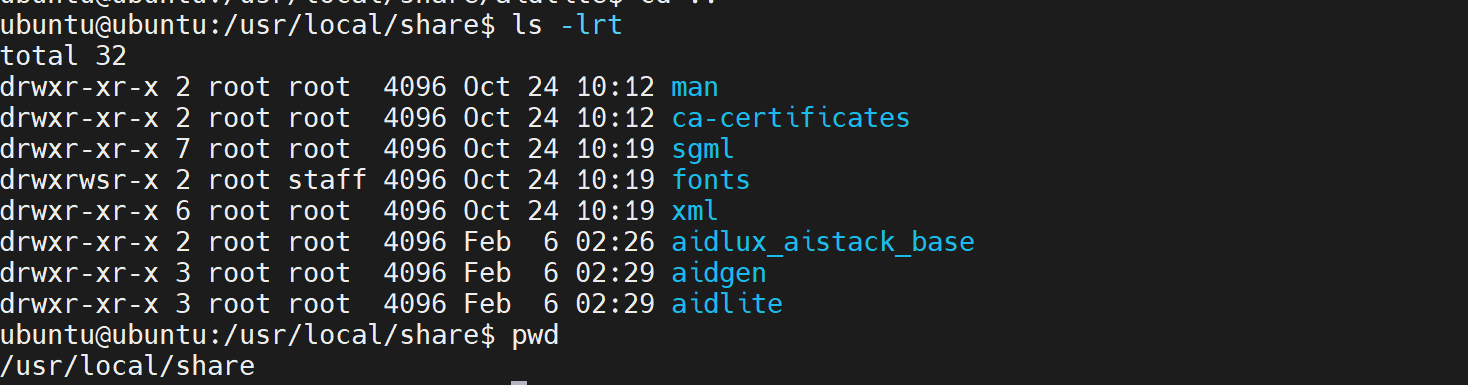
sudo ln -s /usr/lib/aarch64-linux-gnu/libOpenCL.so.1 /usr/lib/aarch64-linux-gnu/libOpenCL.soAfter the installation is complete, check that the aidlite and aidgen directories have been added under /usr/local/share.
Device Authorization
Get the Device SN
cat /sys/devices/soc0/serial_numberGet the License File
Provide the SN to APLUX technical support so that they can generate the device-specific license file. Place the generated file under /etc/opt/aidlux/license/AidLuxLics.
Quick Start
Developers need to follow the steps below to run AI model inference on an edge device using the Model Farm:
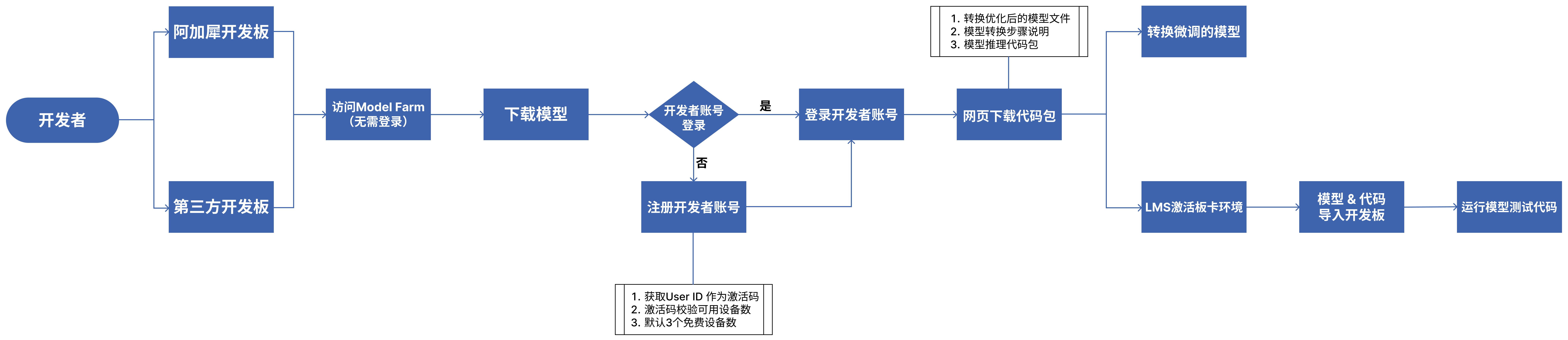
We also provide a concrete example to help developers get started with the Model Farm more quickly: Deploy the YOLOv5s model to a Qualcomm QCS8550 device via the Model Farm
Prerequisites
Prepare the Development Board
The models provided by the Model Farm are adapted and optimized for the Qualcomm Dragonwing IoT chipset platform, and have been performance-tested on development boards equipped with Qualcomm chips. The Model Farm currently supports the following Qualcomm chip models:
- Qualcomm QCS6490
- Qualcomm QCS8550
- IQ9075
- IQ8275
Prepare a Developer Account
Developers can browse model information and performance metrics on the Model Farm without logging in.
When developers need to download models and example code, they must log in with a developer account.
- Register as an APLUX developer
- Visit: Developer Account Registration
- Fill in the relevant developer information as prompted and required by the registration form
- After verifying that the information is correct, submit the account creation request
Login to the Model Farm
Web login
Visit Model Farm

MMS login
APLUX board users can also log in to the Model Farm through the Model Management Service (MMS) component built into the AidLux SDK, as follows:
# Login to the Model Farm
$ mms login -u <developer account username> -p <developer account password>
A successful login will display:
Login successfully.Viewing Models
Developers can search for models on the Model Farm according to their needs, view the detailed model information, and make quick evaluations.
Method 1: View via the web
Developers can browse the Model Farm website in a browser and view model details.
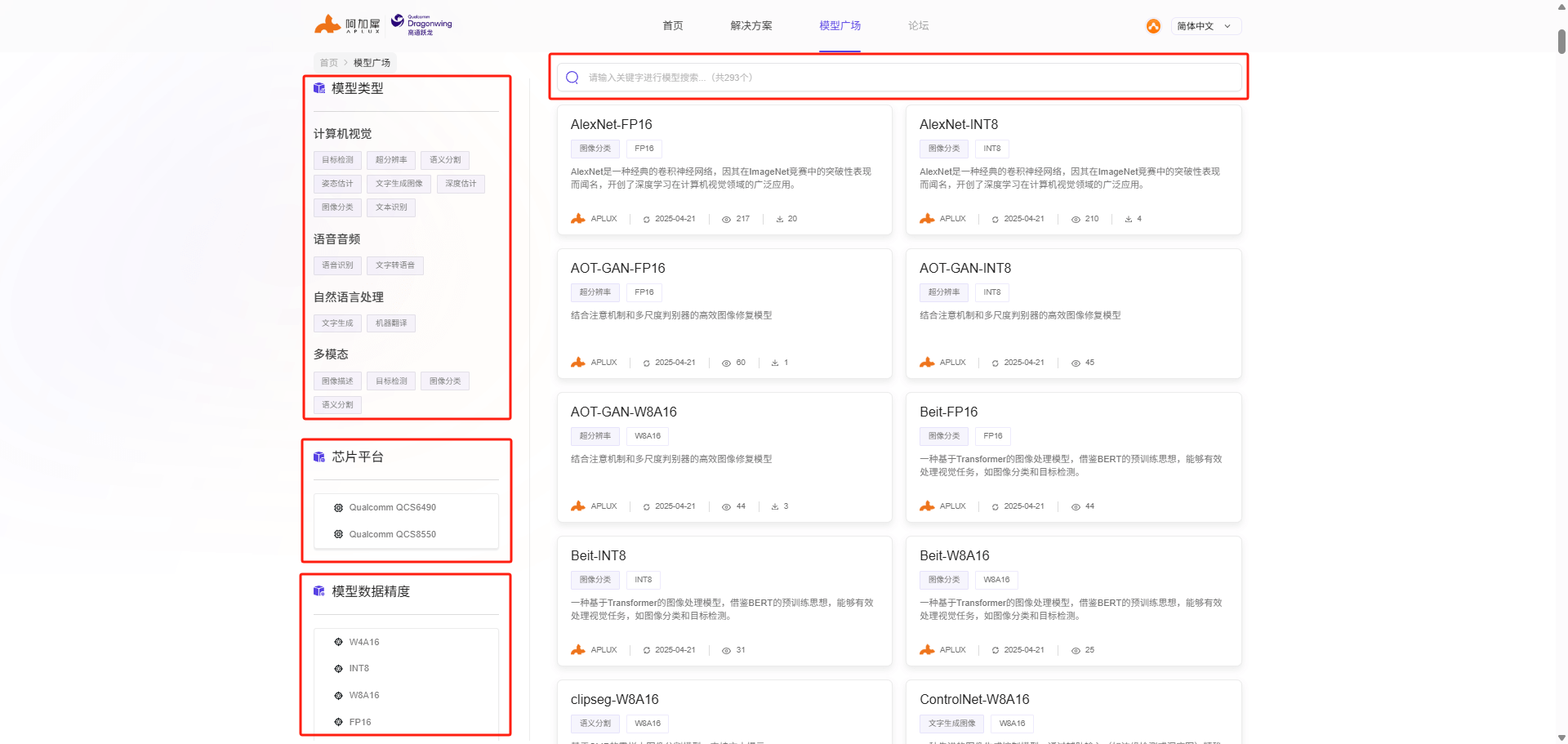
The Model Farm provides multiple ways to filter and search for models:
- Filter by model type
- Filter by model precision
- Filter by chipset platform
- Keyword search
Method 2: View via MMS
APLUX board users can also view model information on the Model Farm through the Model Management Service (MMS) component built into the AidLux SDK.
Example of searching for a model with MMS:
# List all models
$ mms list# Search for a model by name
$ mms list yolo
Model Precision Chipset Backend
----- --------- ------- -------
YOLO-NAS-l FP16 Qualcomm QCS8550 QNN2.29
YOLO-NAS-l INT8 Qualcomm QCS6490 QNN2.29
YOLO-NAS-l INT8 Qualcomm QCS8550 QNN2.29
YOLO-NAS-l W8A16 Qualcomm QCS6490 QNN2.29
YOLO-NAS-l W8A16 Qualcomm QCS8550 QNN2.29
YOLO-NAS-m FP16 Qualcomm QCS8550 QNN2.29
YOLO-NAS-m INT8 Qualcomm QCS6490 QNN2.29
YOLO-NAS-m INT8 Qualcomm QCS8550 QNN2.29Downloading the Model
Method 1: Download via the web
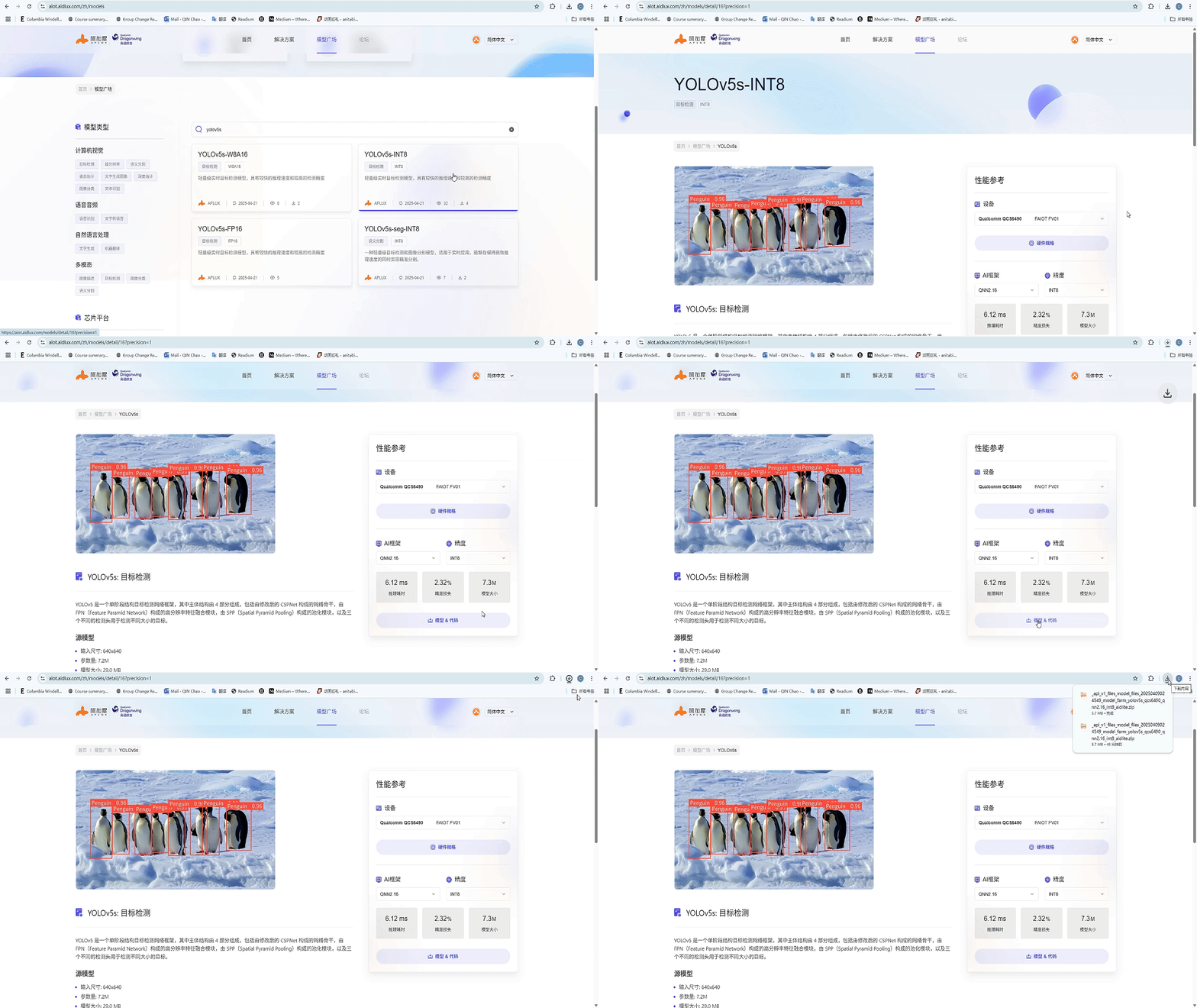
On the model detail page, click the corresponding button under Performance Reference to download the model and code package.
Method 2: Download via MMS
After successfully logging in to the Model Farm with the mms login command, developers can use the mms get command to download the model and example code:
# Download the yolov6l model with INT8 precision, optimized for the QCS8550 chipset, using the QNN2.23 inference framework
$ mms get -m yolov6l -p int8 -c qcs8550 -b qnn2.23
Downloading model from https://aiot.aidlux.com to directory: /var/opt/modelfarm_models

Downloading [yolov6l_qcs8550_qnn2.23_int8_aidlite.zip] ... done! [40.45MB in 375ms; 81.51MB/s]

Download complete!
For detailed usage, refer to the output of the mms get -h command.
Model Performance Reference
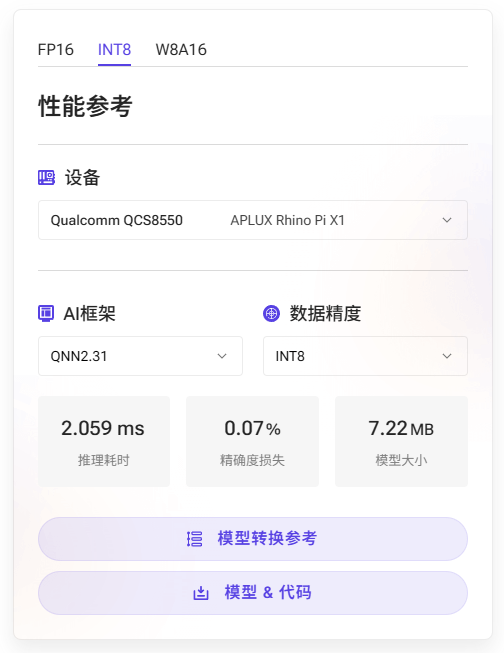
The model detail page of the Model Farm provides the measured performance of AI models on the corresponding hardware.
- Device: the development board model and corresponding chipset model used for the measurement
- AI framework: the framework and version used for model conversion and inference
- Model precision: the data precision used by the converted model
- Inference time: the measured inference time of the model, excluding pre/post-processing
- Accuracy loss: the cosine similarity between the output matrices of the source model (FP32) and the converted model
- Model size: the file size of the converted model
💡Note
For the same SoC chip, model performance on devices with different hardware specifications should be treated as reference data only
Take YOLOv5s running on the MeiG SNM972 (QCS8550) as an example:
Testing the Model
Models downloaded from the Model Farm can be tested for inference in the following two ways:
Inferring with APLUX AidLite
APLUX provides the AidLite AI inference framework, which is used to invoke the Qualcomm NPU on edge devices to run AI model inference.
All models supported by the Model Farm can be inferred using the AidLite SDK. In addition, the Model Farm also provides the pre/post-processing code for the corresponding models, ensuring that developers can quickly view the model results.
Through the Downloading the Model step, developers can obtain a complete package consisting of the model file + inference code, whose file structure is shown below (using YOLOv5s as an example):
/model_farm_yolov5s

    |__ models # Model files

    |__ python # Python-based model inference code

    |__ cpp # C++-based model inference code

    |__ README.md # Model information description & related software dependency installation guide
Running the model test case requires the following steps:
- Activate the development board environment: refer to Prerequisites for the activation method
- Install AidLite and other software environment dependencies: refer to
README.md - Run the example: refer to
README.md
Inferring with Qualcomm QNN
Refer to the Qualcomm QNN documentation
Converting a Fine-Tuned Model
APLUX provides the AIMO model optimization platform, which is used to convert models to the Qualcomm-platform-specific format.
Almost all models supported by the Model Farm can be converted using AIMO. Based on this, the Model Farm not only provides converted and optimized model files, but also provides the reference steps for converting the model with AIMO.
The AIMO model conversion reference steps can be viewed in the following two places:
- In the Performance Reference module on the right side of the model detail page; click Model Conversion Reference to access it.
- In the Model Conversion Reference module of the
README.mdfile in the code package; click the link to access it.
For an introduction to and usage of AIMO, refer to: AIMO Model Optimization Platform User Guide
Complete Example
YOLOv5s Model Deployment
This example shows how to deploy the YOLOv5s model to a Qualcomm QCS8550 device using the Model Farm
Step 1: Visit the website and search for the model
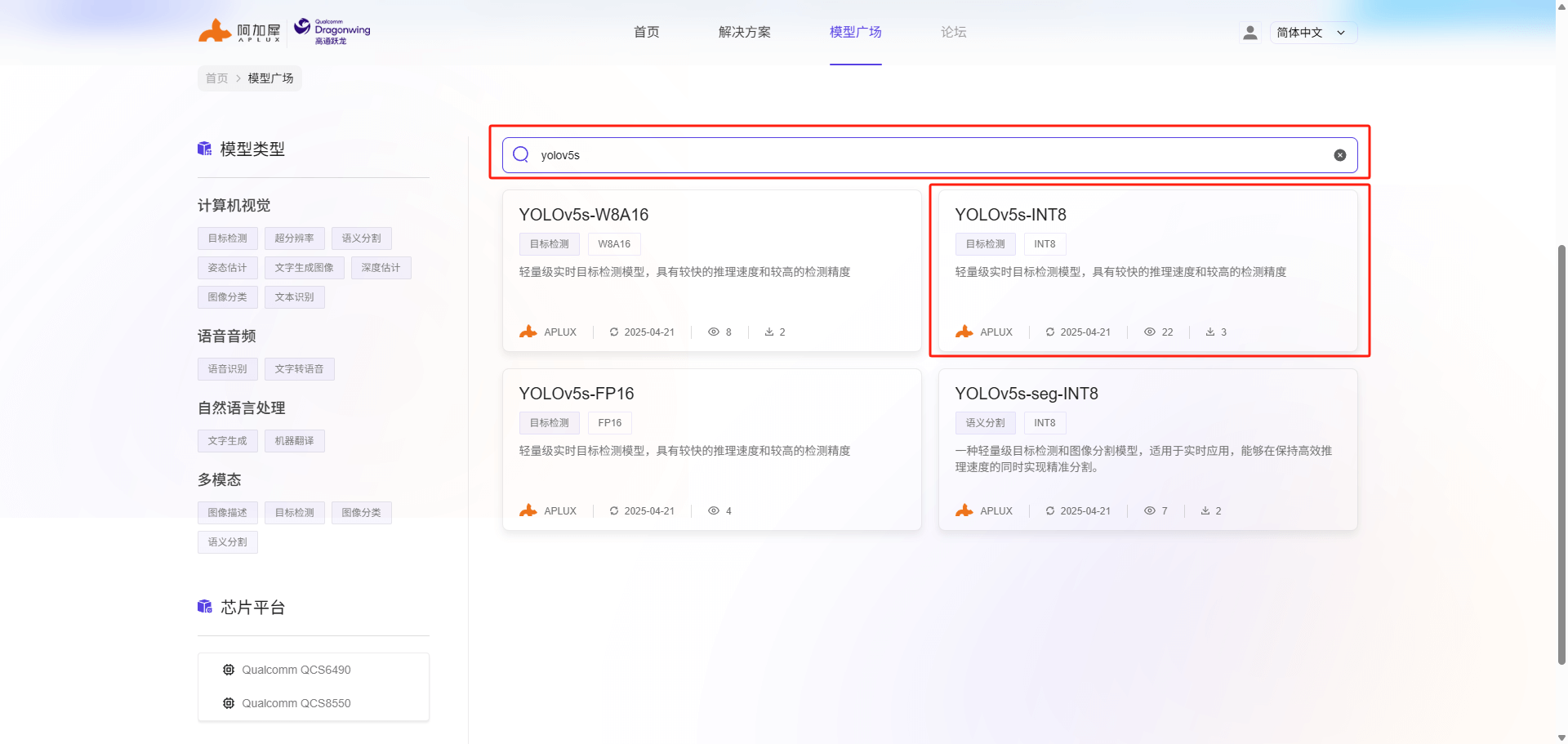
Developers can directly access the Model Farm in a web browser: https://aiot.aidlux.com/zh
Search for the YOLOv5s model in the search bar to find versions with different quantization precisions. In this case, we select INT8 quantization precision and click the YOLOv5s-INT8 model card to view the details.
Step 2: View the model performance
The left side of the model detail page shows the model introduction and related tool descriptions, and the floating window on the right displays the reference performance of the model on the corresponding hardware
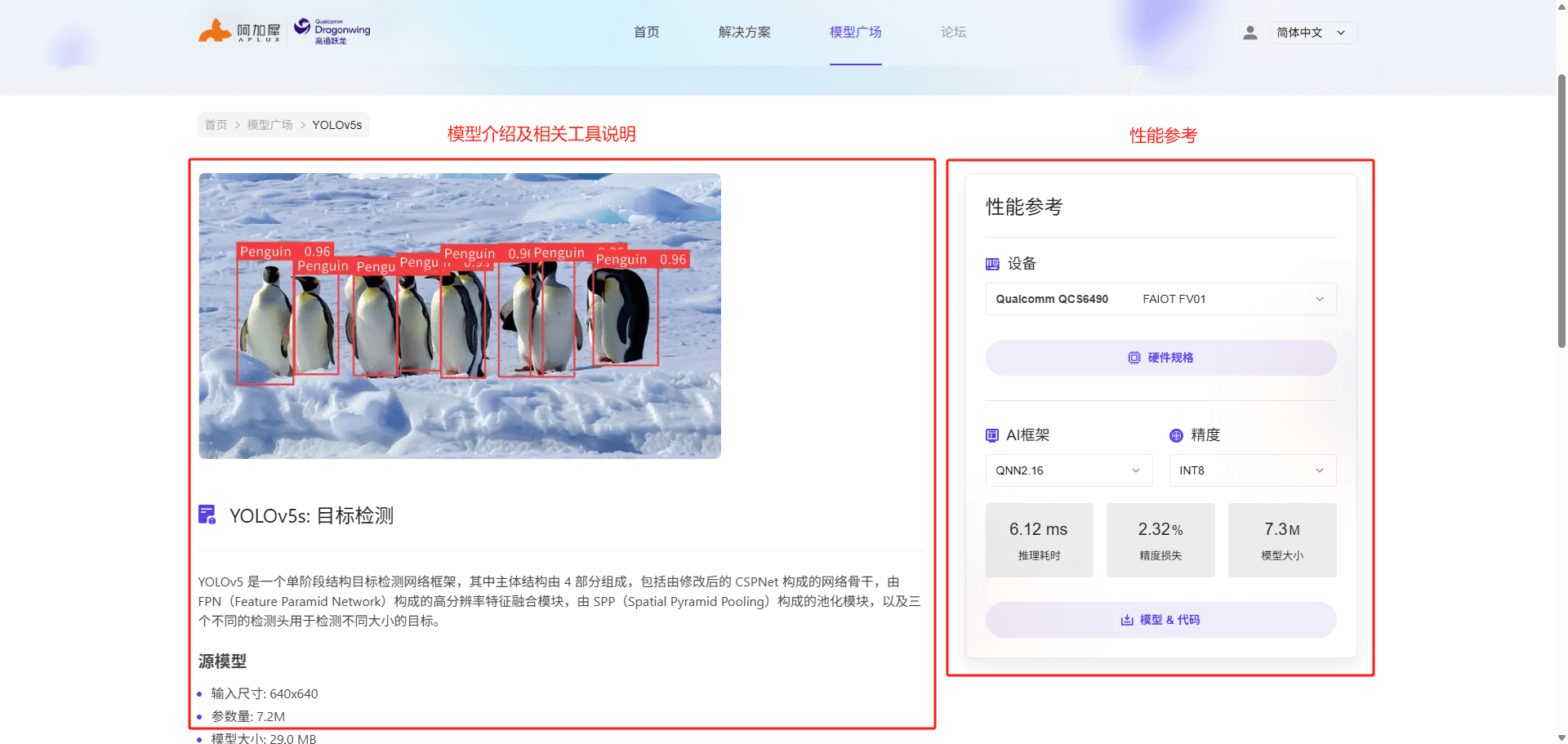
We select the MeiG SNM972 device (QCS8550) as the reference hardware and can see the performance metrics of YOLOv5s with INT8 precision on this hardware, as shown in the figure below:
💡Note
The inference time metric refers to the time spent running the model, excluding pre/post-processing code