MMS Usage & Access to Preview Models
Using mms requires a Model Farm account. Please visit Model Farm account registration
System Dependency Configuration
Configure the AidLux Package Source
# Download the correct public key
sudo wget -O- https://archive.aidlux.com/ubuntu24/public.key | gpg --dearmor | sudo tee /etc/apt/trusted.gpg.d/private-aidlux.gpg > /dev/null

# Edit the source list file
sudo vim /etc/apt/sources.list.d/private-aidlux.list

# Add the repository provided by AidLux to the source file
deb [arch=arm64 signed-by=/etc/apt/trusted.gpg.d/private-aidlux.gpg] https://archive.aidlux.com/ubuntu24 noble main

# Update the package cache
sudo apt update
After the update is complete, you can use the following command to list the SDK dependencies officially provided by AidLux:
sudo apt list | grep aid | grep unknown# Install software
# Must be installed first because they are not included in the system by default
sudo apt install python3 python3-pip libopencv-dev python3-opencv net-tools
# Must be installed before aidlite
sudo apt install aidlux-aistack-base aidrtcm
# Install aidlite and its dependencies
sudo apt install aid-lms aidlms-sdk aidlite-sdk cmake
sudo apt-get install libfmt-dev nlohmann-json3-dev
sudo apt install aidlite-*
# Enable DSP support
sudo apt-get install qcom-fastrpc1
sudo apt-get install qcom-fastrpc-dev
# Install aidgen-sdk
sudo apt install aidgen-qnn240-sdk
# Install the mms service
sudo apt install aid-mms
# Enable GPU support
sudo add-apt-repository ppa:ubuntu-qcom-iot/qcom-noble-ppa
sudo apt install qcom-adreno-cl1
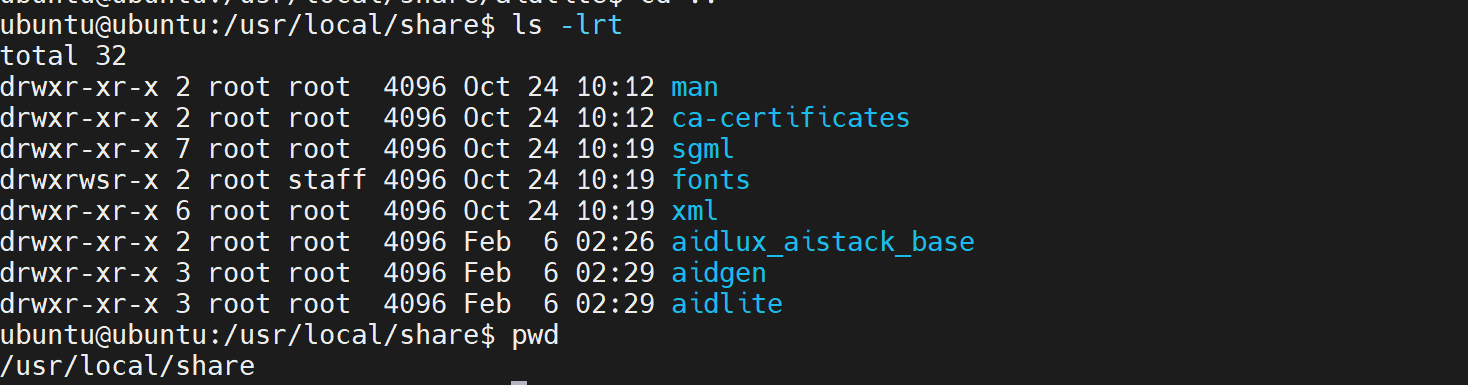
sudo ln -s /usr/lib/aarch64-linux-gnu/libOpenCL.so.1 /usr/lib/aarch64-linux-gnu/libOpenCL.soAfter the installation is complete, check that the aidlite and aidgen directories have been added under /usr/local/share.
Device Authorization
Get the Device SN
cat /sys/devices/soc0/serial_numberGet the License File
Provide the SN to APLUX technical support so that they can generate the device-specific license file. Place the generated file under /etc/opt/aidlux/license/AidLuxLics.
MMS Usage
MMS is a component provided for APLUX board users. It allows users to log in to the Model Farm via the command line to query and download model files. The specific process is as follows:
- Login
mms login

# Enter your username:
# Enter your password:

# A message will appear after entering the correct credentials
# Login successfully.- Model Query
# List all models
mms list

# Search for a model by name
mms list yolo
Model        Precision  Chipset           Backend
-----        ---------  -------           -------
YOLO-NAS-l   FP16       Qualcomm QCS8550  QNN2.29
YOLO-NAS-l   INT8       Qualcomm QCS6490  QNN2.29
YOLO-NAS-l   INT8       Qualcomm QCS8550  QNN2.29
YOLO-NAS-l   W8A16      Qualcomm QCS6490  QNN2.29
YOLO-NAS-l   W8A16      Qualcomm QCS8550  QNN2.29
YOLO-NAS-m   FP16       Qualcomm QCS8550  QNN2.29
YOLO-NAS-m   INT8       Qualcomm QCS6490  QNN2.29
YOLO-NAS-m INT8 Qualcomm QCS8550 QNN2.29- Model Download
# -m: model name
# -p: model precision
# -c: chipset
# -b: qnn version
# Download the yolov6l model with INT8 precision, optimized for the QCS8550 chipset, using the QNN2.23 inference framework
mms get -m yolov6l -p int8 -c qcs8550 -b qnn2.23


Downloading model from https://aiot.aidlux.com to directory: /var/opt/modelfarm_models

Downloading [yolov6l_qcs8550_qnn2.23_int8_aidlite.zip] ... done! [40.45MB in 375ms; 81.51MB/s]

Download complete!
Acquiring Preview Section Models
Models in the preview section of the Model Farm cannot be downloaded via the web interface. Developers can download preview section models on APLUX boards using the mms command. The following example demonstrates how to retrieve the MobileClip2-S3 model.
- Login via
mms
mms login

# Enter your username:
# Enter your password:

# A message will appear after entering the correct credentials
# Login successfully.- Query the model
mms list mobileclip # Supports keyword search

# The following output will be shown
Model           Precision  Chipset           Backend
-----           ---------  -------           -------
MobileClip-S2   FP16       Qualcomm QCS8550  QNN2.31
MobileClip2-S3 FP16 Qualcomm QCS8550 QNN2.36- Download MobileClip2-S3
# -m: model name
# -p: model precision
# -c: chipset
# -b: qnn version
mms get -m MobileClip2-S3 -p fp16 -c qcs8550 -b qnn2.36

# Model resources are downloaded to /var/opt/modelfarm_models by default