Model Farm Preview User Guide
Introduction
The Model Farm proactively adapts cutting-edge or popular AI models. To help developers learn about the Model Farm model adaptation and release plans and the related model performance parameters in advance, we have launched the Model Farm Preview.
Model Farm Preview is used in the same way as the Model Farm, with a unified interface and interaction. Developers can quickly view the performance parameters of models that the Model Farm is about to release, or obtain support by contacting APLUX to get the relevant model files and inference code in advance.
💡Note
Model Farm Preview is only for viewing model adaptation status and related performance parameters; models cannot be downloaded or used. You need to wait until the model is officially released before downloading and using it on the Model Farm.
Quick Start
Model Farm Preview only displays the model performance parameters in advance and does not allow downloads, so developers can access all information on this page without logging in
System Dependency Configuration
Configure the AidLux Package Source
# Download the correct public key
sudo wget -O- https://archive.aidlux.com/ubuntu24/public.key | gpg --dearmor | sudo tee /etc/apt/trusted.gpg.d/private-aidlux.gpg > /dev/null

# Edit the source list file
sudo vim /etc/apt/sources.list.d/private-aidlux.list

# Add the repository provided by AidLux to the source file
deb [arch=arm64 signed-by=/etc/apt/trusted.gpg.d/private-aidlux.gpg] https://archive.aidlux.com/ubuntu24 noble main

# Update the package cache
sudo apt update
After the update is complete, you can use the following command to list the SDK dependencies officially provided by AidLux:
sudo apt list | grep aid | grep unknown# Install software
# Must be installed first because they are not included in the system by default
sudo apt install python3 python3-pip libopencv-dev python3-opencv net-tools
# Must be installed before aidlite
sudo apt install aidlux-aistack-base aidrtcm
# Install aidlite and its dependencies
sudo apt install aid-lms aidlms-sdk aidlite-sdk cmake
sudo apt-get install libfmt-dev nlohmann-json3-dev
sudo apt install aidlite-*
# Enable DSP support
sudo apt-get install qcom-fastrpc1
sudo apt-get install qcom-fastrpc-dev
# Install aidgen-sdk
sudo apt install aidgen-qnn240-sdk
# Install the mms service
sudo apt install aid-mms
# Enable GPU support
sudo add-apt-repository ppa:ubuntu-qcom-iot/qcom-noble-ppa
sudo apt install qcom-adreno-cl1
sudo ln -s /usr/lib/aarch64-linux-gnu/libOpenCL.so.1 /usr/lib/aarch64-linux-gnu/libOpenCL.soAfter the installation is complete, check that the aidlite and aidgen directories have been added under /usr/local/share.
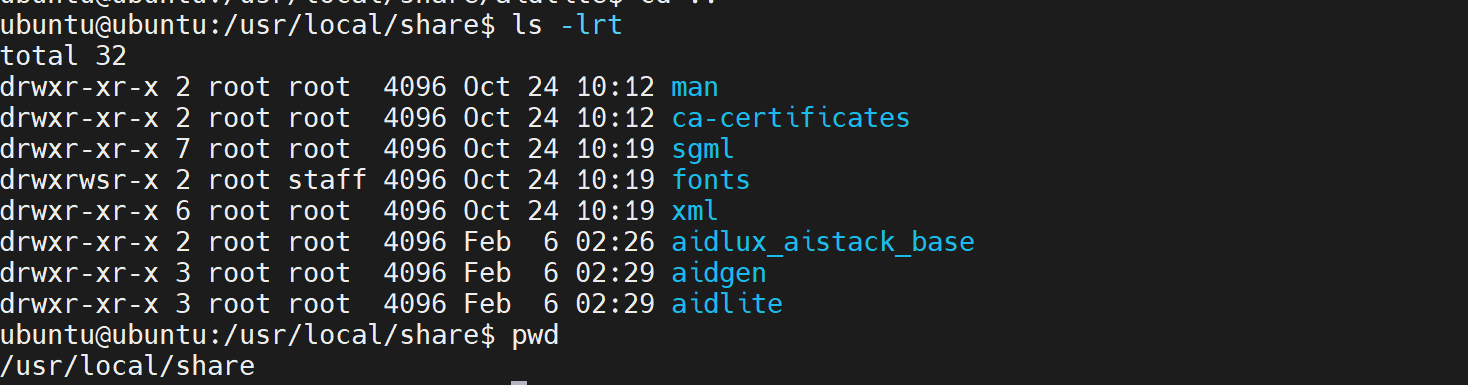
Device Authorization
Get the Device SN
cat /sys/devices/soc0/serial_numberGet the License File
Provide the SN to APLUX technical support so that they can generate the device-specific license file. Place the generated file under /etc/opt/aidlux/license/AidLuxLics.
Accessing the Model Farm Preview Page
Developers can click the link to directly access the Model Farm Preview interface: Model Farm Preview
Developers can also enter the Model Farm Preview interface through the Model Farm interface interaction:

Viewing Models
Developers can search for models on Model Farm Preview according to their needs, view the detailed model information, and make quick evaluations.
Model Farm Preview provides multiple ways to filter and search for models:
- Filter by model type
- Filter by model precision
- Filter by chipset platform
- Keyword search
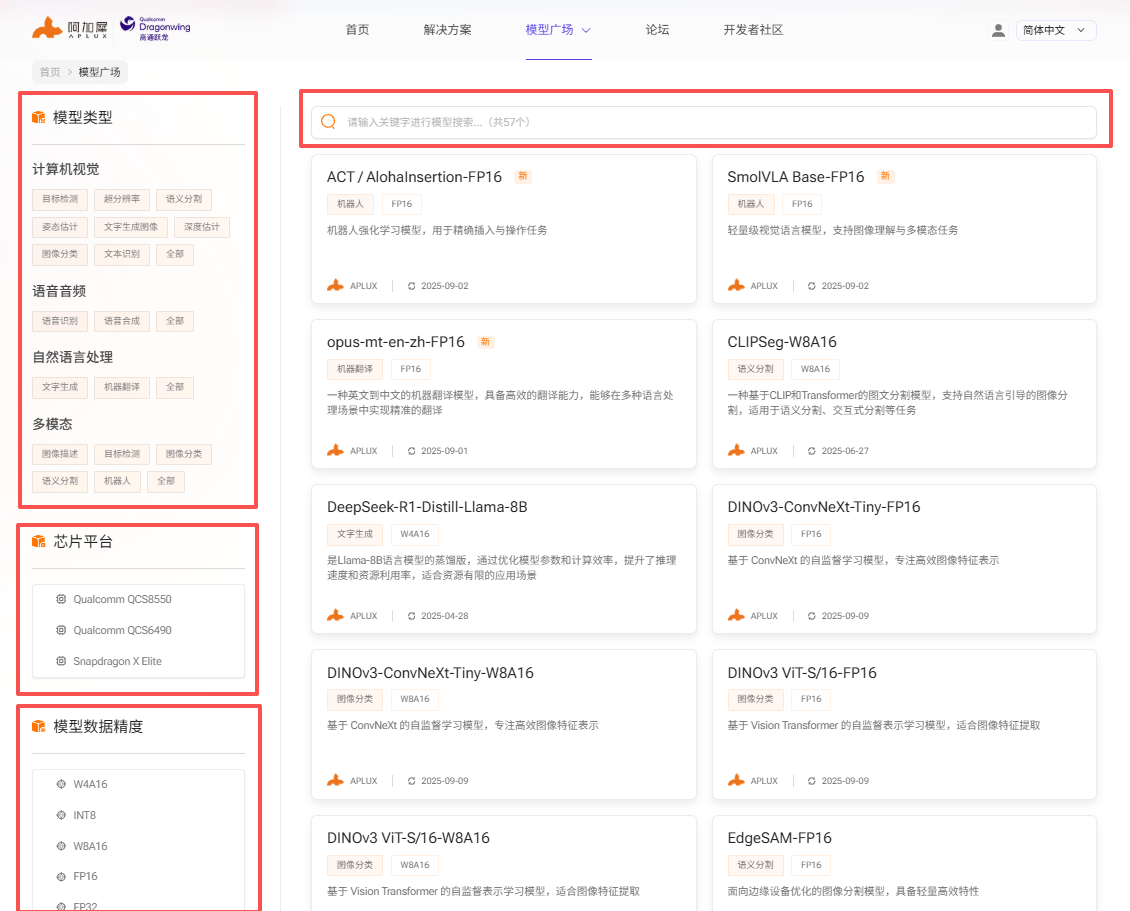
Model Performance Reference
The model detail page of Model Farm Preview provides the measured performance of AI models on the corresponding hardware
- Device: the development board model and corresponding chipset model used for the measurement
- AI framework: the framework and version used for model conversion and inference
- Model precision: the data precision used by the converted model
- Inference time: the measured inference time of the model, excluding pre/post-processing
- Accuracy loss: the cosine similarity between the output matrices of the source model (FP32) and the converted model
- Model size: the file size of the converted model
💡Note
For the same SoC chip, model performance on devices with different hardware specifications should be treated as reference data only
Take SigLIP-so400m running on the MeiG SNM972 (QCS8550) as an example:
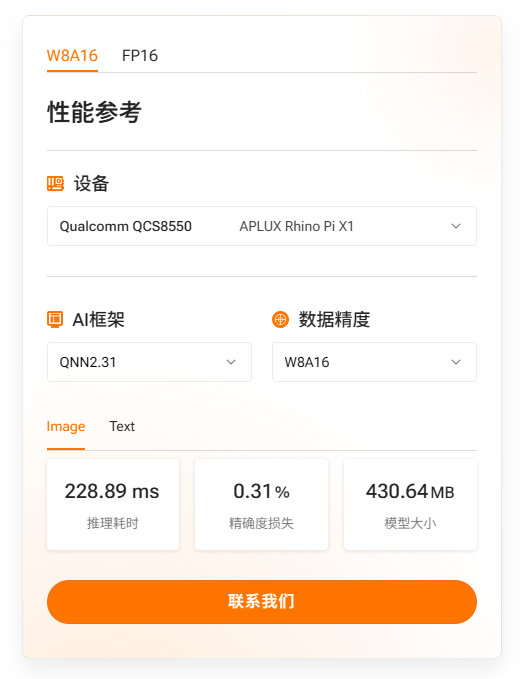
Getting Model Files and Code in Advance
Models in the preview section of the Model Farm cannot be downloaded via the web interface. Developers can download preview section models on APLUX boards using the mms command. The following example demonstrates how to retrieve the MobileClip2-S3 model.
- Login via
mms
mms login

# Enter your username:
# Enter your password:

# A message will appear after entering the correct credentials
# Login successfully.- Query the model
mms list mobileclip # Supports keyword search

# The following output will be shown
Model           Precision  Chipset           Backend
-----           ---------  -------           -------
MobileClip-S2   FP16       Qualcomm QCS8550  QNN2.31
MobileClip2-S3 FP16 Qualcomm QCS8550 QNN2.36- Download MobileClip2-S3
# -m: model name
# -p: model precision
# -c: chipset
# -b: qnn version
mms get -m MobileClip2-S3 -p fp16 -c qcs8550 -b qnn2.36

# Model resources are downloaded to /var/opt/modelfarm_models by default