Deploy VLM with AidGen
Introduction
Edge deployment of a vision language model (VLM) refers to compressing, quantizing, and deploying a large multimodal model that originally runs in the cloud onto a local device, enabling offline, low-latency natural language understanding and generation. This chapter is based on the AidGen inference engine and demonstrates how to complete the deployment, loading, and conversation process of a multimodal large model on an edge device.
In this case, multimodal large model inference runs on the device, and C++ code calls relevant interfaces to receive user input and return conversation results in real time.
- Device: IQ8275
- System: Ubuntu 24.04
- Model: Qwen2.5-VL-3B (504x336)
Supported Platforms
| Platform | Execution Method |
|---|---|
| IQ8275 | Ubuntu 24.04 |
Prerequisites
IQ8275 hardware
Ubuntu 24.04 system
System Dependency Configuration
Configure the AidLux Package Source
# Download the correct public key
sudo wget -O- https://archive.aidlux.com/ubuntu24/public.key | gpg --dearmor | sudo tee /etc/apt/trusted.gpg.d/private-aidlux.gpg > /dev/null

# Edit the source list file
sudo vim /etc/apt/sources.list.d/private-aidlux.list

# Add the repository provided by AidLux to the source file
deb [arch=arm64 signed-by=/etc/apt/trusted.gpg.d/private-aidlux.gpg] https://archive.aidlux.com/ubuntu24 noble main

# Update the package cache
sudo apt update
After the update is complete, you can use the following command to list the SDK dependencies officially provided by AidLux:
sudo apt list | grep aid | grep unknown# Install software
# Must be installed first because they are not included in the system by default
sudo apt install python3 python3-pip libopencv-dev python3-opencv net-tools
# Must be installed before aidlite
sudo apt install aidlux-aistack-base aidrtcm
# Install aidlite and its dependencies
sudo apt install aid-lms aidlms-sdk aidlite-sdk cmake
sudo apt-get install libfmt-dev nlohmann-json3-dev
sudo apt install aidlite-*
# Enable DSP support
sudo apt-get install qcom-fastrpc1
sudo apt-get install qcom-fastrpc-dev
# Install aidgen-sdk
sudo apt install aidgen-sdk
sudo apt install aidgen-qnn*
# Install the mms service
sudo apt install aid-mms
# Enable GPU support
sudo apt-add-repository -s ppa:ubuntu-qcom-iot/qcom-ppa
sudo apt install qcom-adreno-cl1
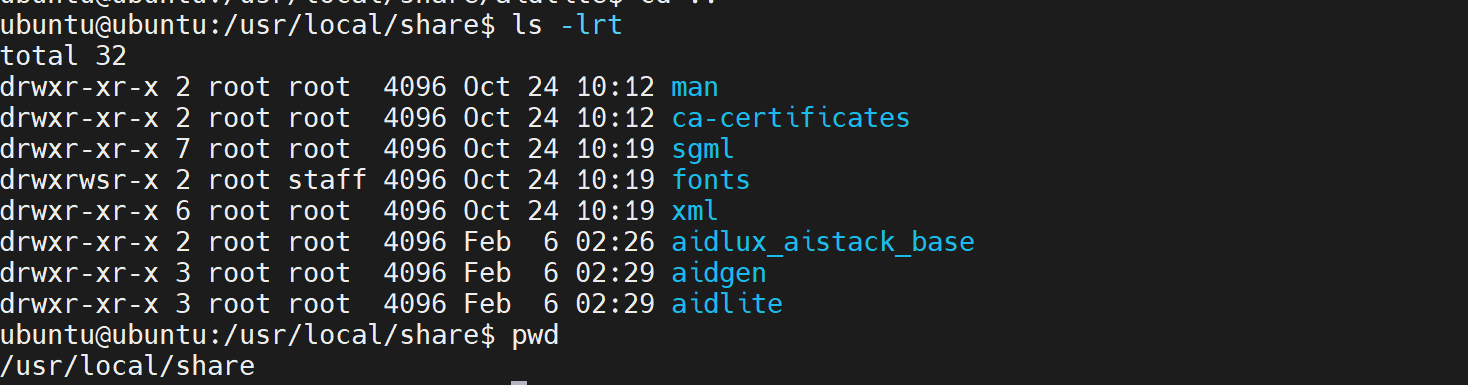
sudo ln -s /usr/lib/aarch64-linux-gnu/libOpenCL.so.1 /usr/lib/aarch64-linux-gnu/libOpenCL.soAfter the installation is complete, check that the aidlite and aidgen directories have been added under /usr/local/share.
Device Authorization
Get the Device SN
cat /sys/devices/soc0/serial_numberGet the License File
Provide the SN to APLUX technical support so that they can generate the device-specific license file. Place the generated file under /etc/opt/aidlux/license/AidLuxLics.
Activate the License
sudo /opt/aidlux/cpf/aid-lms/manager.sh restartCase Deployment
Step 1: Copy the AidGen SDK Code Example
# Copy the test code
cd /home/ubuntu/aidmlm
cp -r /usr/local/share/aidgen/examples/ ./
Step 2: Retrieve the Model
Since Qwen2.5-VL-3B (504x336) is currently in the Model Farm preview section, it must be retrieved via the
mmscommand.
Using mms requires a Model Farm account. Please visit Model Farm account registration
# Login
mms login

# Search for the model
mms list Qwen2.5-VL-3B

# Download the model
mms get -m 'Qwen2.5-VL-3B-Instruct (504x336)' -p w4a16 -c IQ8 -b qnn2.36 -d /home/ubuntu/aidmlm/

cd /home/ubuntu/aidmlm/
unzip qnn236_qcs8275_cl2048.zip
Step 3: Check the Model Directory
The files are distributed as follows:
/home/ubuntu/aidmlm/qnn236_qcs8275_cl2048
├── window_attention_mask.raw
├── veg.serialized.bin.aidem
├── qwen2p5-vl-3b-qnn236-qcs8275-cl2048_3_of_3.serialized.bin.aidem
├── qwen2p5-vl-3b-qnn236-qcs8275-cl2048 2_of_3.serialized.bin.aidem
├── qwen2p5-vl-3b-qnn236-qcs8275-cl2048_1_of_3.serialized.bin.aidem
├── position_ids_sin.raw
├── position_ids_cos.raw
├── full_attention_mask.raw
├── embedding_weights_151936x2048.raw
├── demo512x342.jpeg
├── aidgen_config.json
├── examples
Step 4: Compile and Run
cd /home/ubuntu/aidmlm/

# Replace the files in the aidgen-sdk example
cp qnn236_qcs8275_cl2048/examples/* ./examples/
cd ./examples

mkdir build && cd build
cmake .. && make

# Copy the compiled example program test_qwen25vl to the model directory
cp test_qwen25vl ../../qnn236_qcs8275_cl2048
cd /home/ubuntu/aidmlm/qnn236_qcs8275_cl2048

./test_qwen25vl qnn240- After the model runs successfully, the following log output is displayed:
#################################################
Image-Text Embedding Input
This image shows a warm scene of a woman and her dog playing on the beach. The woman is sitting on the sand, facing the dog, seemingly interacting or playing with the dog. Her dog is wearing a blue collar and appears to be a Golden Retriever. The background is an open sea and a distant sky, with bright sunshine, giving a warm and peaceful feeling. The whole scene is full of joy and companionship between people and pets.<|im_end|>
#################################################