Edge Deployment of the LocateAnything Series
Introduction
LocateAnything is a vision-language model for fast, high-quality visual grounding. Across the diverse domains of Enterprise Intelligence and Physical AI, it delivers accurate object localization, dense detection, and point-based grounding. Built with a generalist design, the model supports referring expression grounding, multi-object detection, GUI element grounding, and text grounding, demonstrating strong performance in complex and cluttered scenes.
Its core innovation, Parallel Box Decoding (PBD), predicts complete bounding box coordinates in a single parallel step instead of the conventional token-by-token autoregressive decoding. This significantly improves efficiency while preserving geometric consistency, delivering up to 2.5x higher throughput than previous methods.
The model was trained on a ultra-large-scale dataset spanning natural scenes, robotics, autonomous driving, GUI interaction, and document understanding (12 million images, over 138 million queries, and 785 million bounding boxes). It serves as infrastructure for general multimodal perception and has been integrated into NVIDIA's frontier production vision-language models (such as Nemotron 3 Nano Omni), powering their grounding, GUI understanding, and multimodal agentic capabilities.
LocateAnything was developed as part of the Eagle VLM model family. The models released here are intended for research and development purposes only. In addition, LocateAnything contributes to Nemotron and Cosmos as part of their Computer Use and Visual Grounding capabilities.
This chapter demonstrates how to perform deployment, loading, and conversation with the LocateAnything series models on edge devices. The following deployment method is provided:
- AidGen C++ API
In this case, the large language model inference runs on the device side, and the relevant interfaces are called through code to receive user input and return conversation results in real time.
- Device: Rhino Pi-X1
- System: Ubuntu 22.04
- Model: LocateAnything-3B (672x392)
Supported Platforms
| Platform | Running Method |
|---|---|
| Rhino Pi-X1 | Ubuntu 22.04, AidLux |
Preparation
Rhino Pi-X1 hardware
Ubuntu 22.04 system or AidLux system
AidGen Case Deployment
Step 1: Install the AidGen SDK
# Install AidGen SDK
sudo aid-pkg update
sudo aid-pkg -i aidgen-sdk
sudo aid-pkg -i aidgen-qnn240
sudo aid-pkg -i aidgen-qnn248

# Copy test code
cd /home/aidlux/aidmlm

cp -r /usr/local/share/aidgen/examples/ ./
Step 2: Download Model Resources
Since LocateAnything-3B (672x392) is currently in the Model Farm Pro section, it must be retrieved via the
mmscommand.
# Log in
mms login

# Search for the model
mms list locate

# Download the model
mms get -m 'LocateAnything-3B (672x392)' -p w4a16 -c qcs8550 -b qnn2.40 -d /home/aidlux/aidmlm/

cd /home/aidlux/aidmlm/
unzip qnn240_qcs8550_cl2048.zip
Step 3: Confirm Resource Files
The file distribution is as follows:
/home/aidlux/aidmlm/qnn240_qcs8550_cl2048
├── position_ids_sin.raw
├── position_ids_cos.raw
├── locateanything-3b_veg.serialized.bin.aidem
├── locateanything-3b_qnn240_qcs8550_c12048_5_of_5.serialized.bin.aidem
├── locateanything-3b_qnn240_qcs8550_cl2048_4_of_5.serialized.bin.aidem
├── locateanything-3b_qnn240_qcs8550_c12048_3_of_5.serialized.bin.aidem
├── locateanything-3b_qnn240_qcs8550_cl2048_2_of_5.serialized.bin.aidem
├── locateanything-3b_qnn240_qcs8550_c12048_1_of_5.serialized.bin.aidem
├── embedding_weights_152681x2048.raw
├── demo512x342.jpeg
├── aidgen_config.json
├── examples
Step 4: Compile and Run
cd /home/aidlux/aidmlm/

# Replace the files in the aidgen-sdk examples
cp qnn240_qcs8550_cl2048/examples/* ./examples/
cd ./examples

mkdir build && cd build
cmake .. && make

# Copy the compiled example program test_locateanything to the model directory
cp test_locateanything ../../qnn240_qcs8550_cl2048
cd /home/aidlux/aidmlm/qnn240_qcs8550_cl2048

# Run the example program
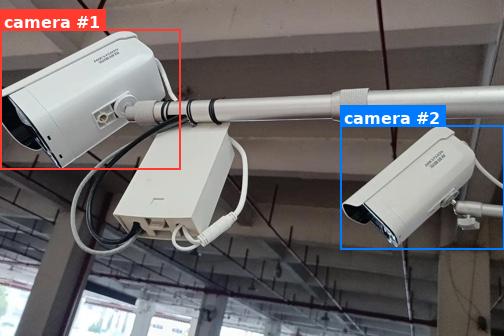
./test_locateanything qnn240- After the model runs successfully, the following log output is displayed:
#################################################
Image-text embedding input
<ref>camera</ref><box><0><89><357><505></box><box><675><372><999><742></box><|im_end|>
#################################################- Based on the model output, run the following example code to locate the specified objects in the image:
#!/usr/bin/env python3
# -*- coding: utf-8 -*-
"""
Draw bounding boxes returned by LocateAnything on the source image.

Box format (Qwen-VL style, normalized to 0-999):
    <ref>camera</ref><box><x1><y1><x2><y2></box><box><x1><y1><x2><y2></box>...
"""

import re
import sys
from pathlib import Path

try:
    from PIL import Image, ImageDraw, ImageFont
except ImportError:
    print("Pillow is required. Install with: pip install pillow", file=sys.stderr)
    sys.exit(1)


# ---- 1. Parse the model output -------------------------------------------------
def parse_ref_boxes(text: str):
    """
    Return a list of (label, [(x1, y1, x2, y2), ...]) tuples.
    Coordinates are kept in the original 0-999 normalized scale.
    """
    pattern = re.compile(
        r"<ref>(?P<label>[^<]+)</ref>"                           # label
        r"(?P<boxes>(?:<box><\d+><\d+><\d+><\d+></box>)+)"      # 1+ boxes; each value is wrapped in <>
    )
    box_re = re.compile(r"<box><(\d+)><(\d+)><(\d+)><(\d+)></box>")

    results = []
    for m in pattern.finditer(text):
        label = m.group("label").strip()
        boxes = [
            (int(b.group(1)), int(b.group(2)),
             int(b.group(3)), int(b.group(4)))
            for b in box_re.finditer(m.group("boxes"))
        ]
        results.append((label, boxes))
    return results


# ---- 2. Convert normalized coords -> pixel coords ------------------------------
def to_pixel(box, img_w, img_h, norm=999):
    x1, y1, x2, y2 = box
    return (
        int(x1 / norm * img_w),
        int(y1 / norm * img_h),
        int(x2 / norm * img_w),
        int(y2 / norm * img_h),
    )


# ---- 3. Draw ------------------------------------------------------------------
def draw_results(image_path, model_output, output_path, norm=999):
    img = Image.open(image_path).convert("RGB")
    draw = ImageDraw.Draw(img)
    W, H = img.size
    print(f"[info] image size: {W}x{H}")

    # try a TTF font; fall back to default
    try:
        font = ImageFont.truetype("/usr/share/fonts/truetype/dejavu/DejaVuSans-Bold.ttf",
                                  size=max(14, W // 30))
    except Exception:
        font = ImageFont.load_default()

    palette = ["#FF3B30", "#007AFF", "#34C759", "#FFCC00",
               "#AF52DE", "#FF9500", "#5AC8FA", "#FF2D55"]
    color_idx = 0

    parsed = parse_ref_boxes(model_output)
    if not parsed:
        print("[warn] no <ref>/<box> pair found in input text.", file=sys.stderr)

    for label, boxes in parsed:
        for i, box in enumerate(boxes):
            color = palette[color_idx % len(palette)]
            color_idx += 1
            px = to_pixel(box, W, H, norm)
            print(f"[box] '{label}' #{i+1} norm={box}  pixel={px}")

            # rectangle (outline)
            draw.rectangle(px, outline=color, width=max(2, W // 250))

            # label background + text
            tag = label if len(boxes) == 1 else f"{label} #{i+1}"
            tb = draw.textbbox((0, 0), tag, font=font)
            tw, th = tb[2] - tb[0], tb[3] - tb[1]
            pad = 4
            tx0, ty0 = px[0], max(0, px[1] - th - 2 * pad)
            tx1, ty1 = tx0 + tw + 2 * pad, ty0 + th + 2 * pad
            # if label would go above the image, place it just below the box
            if ty0 == 0 and px[1] - th - 2 * pad < 0:
                ty0, ty1 = px[1] + 2, px[1] + 2 + th + 2 * pad
            draw.rectangle([tx0, ty0, tx1, ty1], fill=color)
            draw.text((tx0 + pad, ty0 + pad), tag, fill="white", font=font)

    img.save(output_path)
    print(f"[ok] saved result to: {output_path}")


# ---- 4. Main ------------------------------------------------------------------
if __name__ == "__main__":
    # You can also pass the model text as argv[1] if you don't want to edit the script.
    model_output = (
        "<ref>camera</ref><box><0><89><357><505></box><box><675><372><999><742></box>"
    )
    if len(sys.argv) >= 2:
        model_output = sys.argv[1]

    image_path  = "demo512x342.jpeg"
    output_path = "demo512x342_result.jpeg"

draw_results(image_path, model_output, output_path)- Result preview: