Intelligent Scenario Analysis Platform
An edge video intelligence Demo that is downloadable, deployable, and ready for secondary development. Partners can first verify video ingestion, event understanding, and evidence playback, then build manufacturing, security, campus, and retail applications on the APLUX computing platform, system environment, and AidStream SDK.
Hands-on experience: download the Demo resource pack and deploy it on a local device Direct integration: AidStream SDK Supported platforms: Rhino Core Q85 (QCS8550), Rhino Boost Q86 (QCS8625), Rhino Core IQ9 (IQ9075)
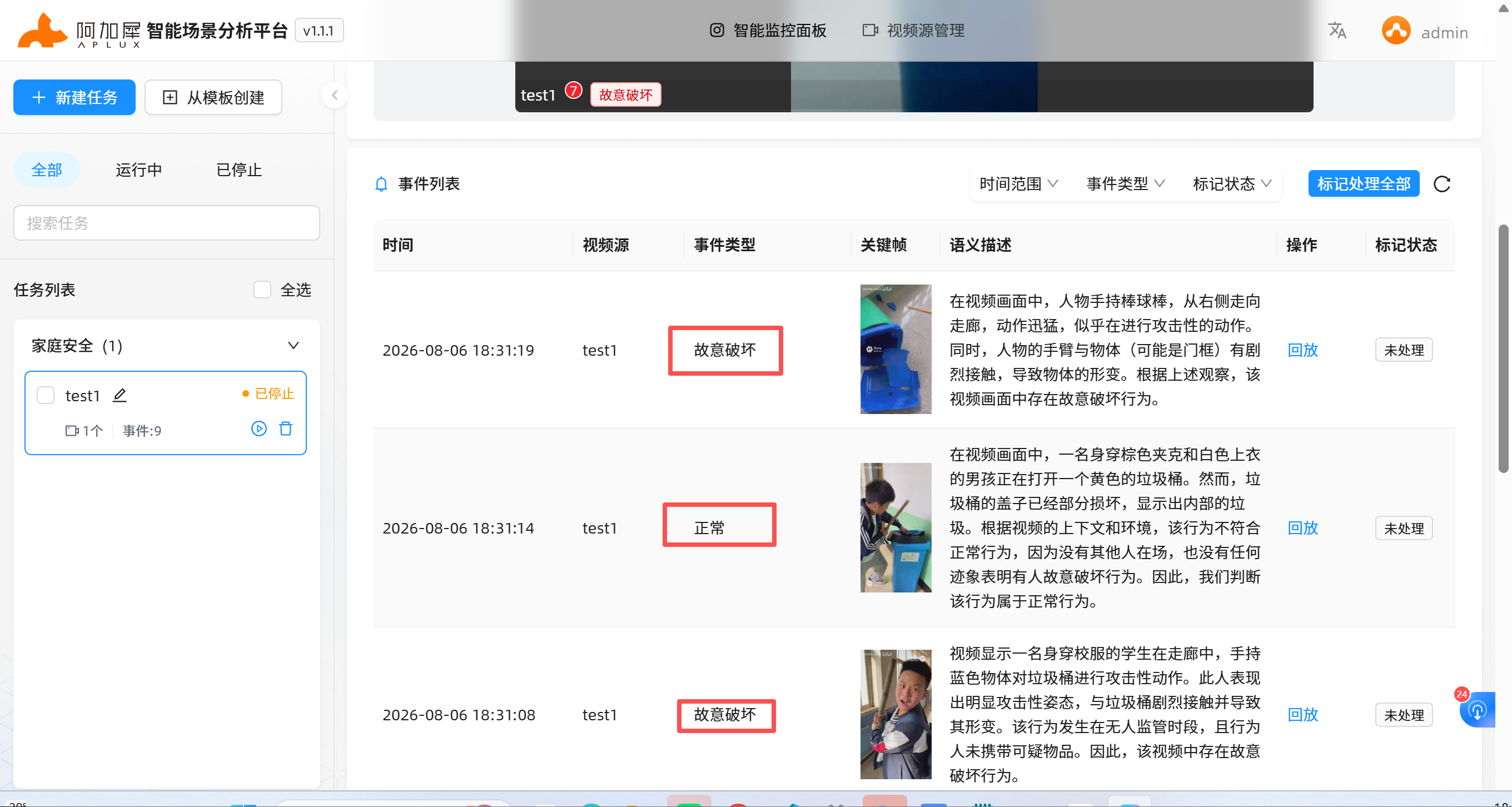
Run the Demo First, Then Start Integrating
The Demo organizes video sources, task configuration, event templates, visual analysis results, and key video evidence in one interface. First-time users do not need to understand the internal call chain — after installation, you can add video, create tasks, and observe event results.
What's in the Resource Pack
- Demo installation package: platform programs, install scripts, and required configuration.
- Experience materials: sample videos, recommended events, and task configuration suggestions.
- Operation guide: installation, startup, task creation, event playback, and FAQ.
- Extension entry: model acquisition, configuration changes, SDK documentation, and secondary development instructions.
Prerequisites: one supported Q85, Q86, or IQ9 device; a computer on the same LAN that can access the device; and a video source such as RTSP, a video file, or a USB camera. Specific conditions depend on the resource pack of the corresponding platform.
Note
Q85, Q86, and IQ9 use the software package of their corresponding platform to prevent the Demo from failing to run properly.
Experience Path
- Choose a platform: confirm Q85, Q86, or IQ9, and the current system and software version.
- Install the Demo: download the matching resource pack, install via the script, and start the scenario analysis service.
- Add video: ingest RTSP, a video file, or a USB camera and confirm the feed is available.
- Create a task: select an event template, detection targets, and analysis parameters, then save the task.
- Review evidence: view structured events, key frames, semantic descriptions, and video clips.
- Start extending: add custom events, replace models, or connect partner business systems.
What You Can See in the Demo
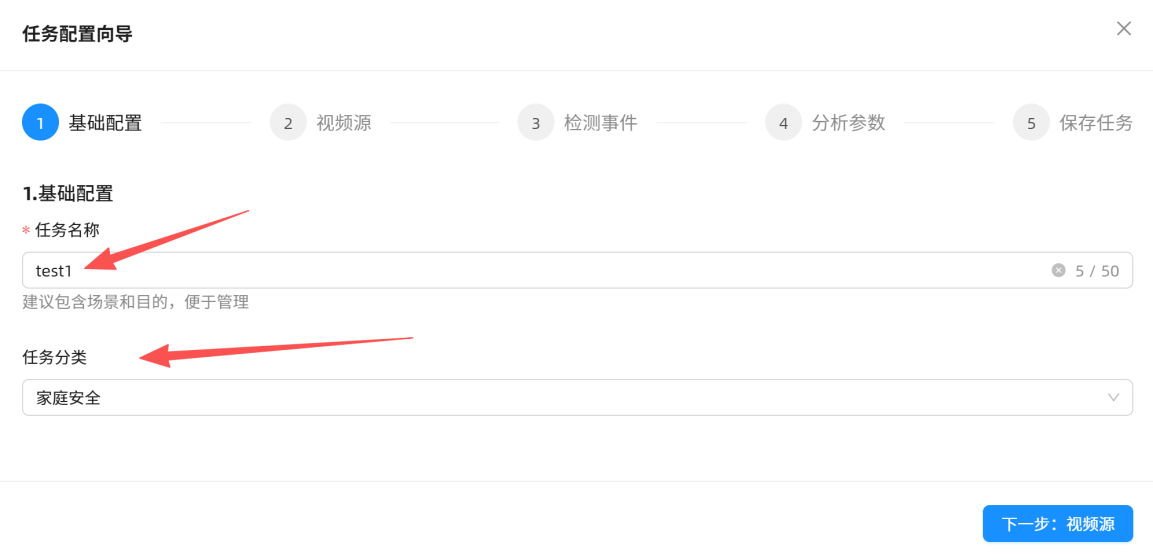
Create an Analysis Task in Five Steps
Complete basic info, video source, detection events, analysis parameters, and task saving in sequence.
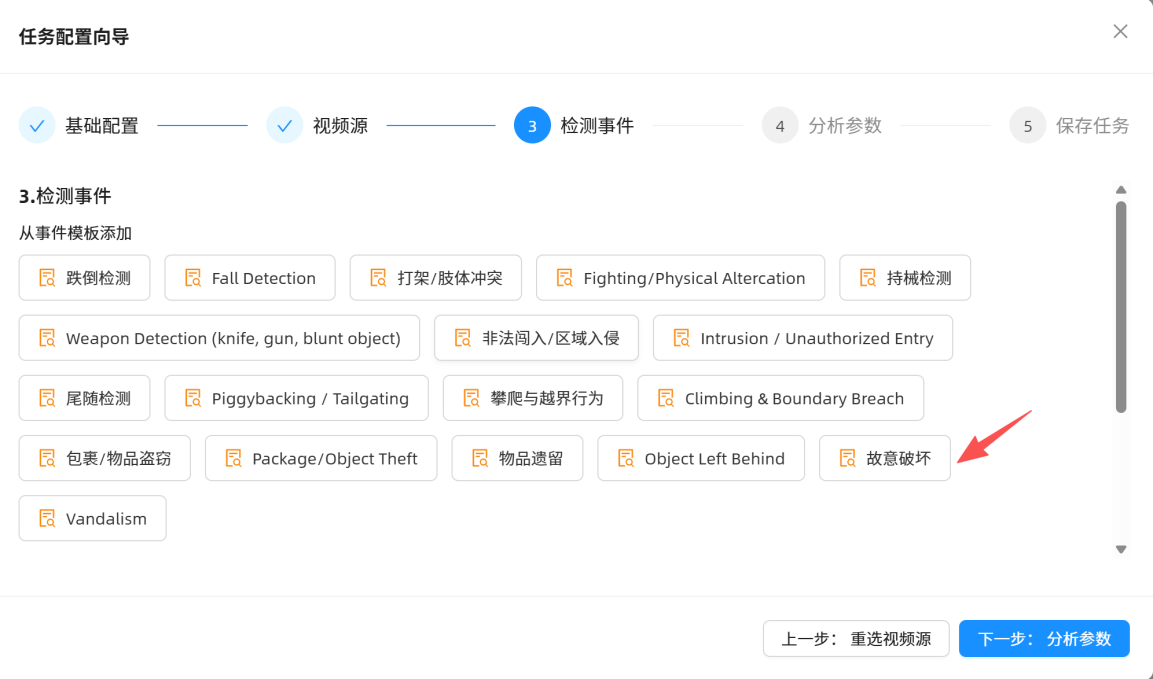
Use Built-in Event Templates
Start with templates such as fall, intrusion, abandoned object, and vandalism, or add custom events.
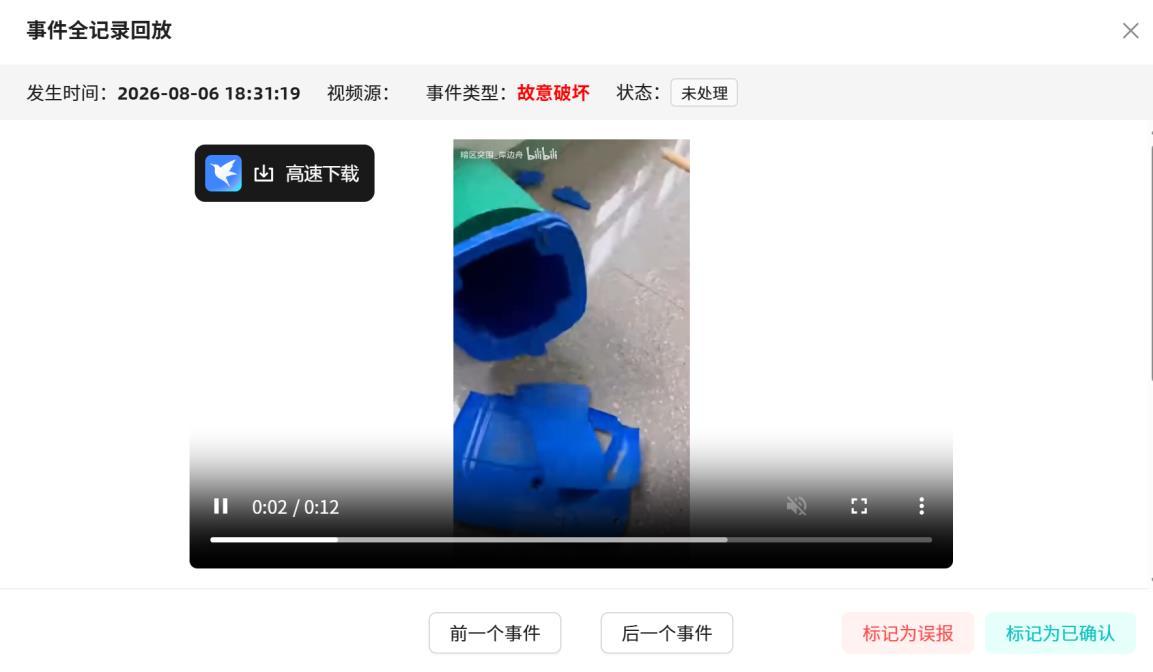
Play Back and Annotate Event Evidence
Associate event time, video source, judgment type, and video clips, and support user confirmation or flagging false positives.
Replace with Other Models
Obtain adapted models from the model resource entry and modify model configuration and task parameters per the development guide.
Build Industry Video Applications on the APLUX Foundation
The Intelligent Scenario Analysis Platform is both a runnable hands-on Demo and a reference implementation that partners can reuse. APLUX provides the edge computing platform, system and driver environment, video ingestion SDK, AI runtime foundation, and adaptation support; partners retain autonomy over algorithm selection, event rules, UI, business processes, and industry system integration.
The reference application demonstrates a practical edge video analysis chain: video is ingested through the AidStream SDK with decoding, frame management, and timestamp handling; partner applications combine lightweight perception models, vision-language models, and rule logic as needed; and finally output structured events and video evidence to VMS, NVR, MES, SCADA, or their own business platform.
What Partners Can Build
Industrial Safety & SOP Compliance
Leverage people, equipment, and work processes to identify protective gear, zone entry, operation steps, and abnormal behavior, and associate analysis results with key frames or video clips.
Smart Campus & Security
Build event analysis services around scenarios such as regional intrusion, abnormal loitering, crowd gathering, and abandoned objects, and connect to existing VMS, NVR, or campus management platforms.
Retail & Service Process Analysis
Define service flows, zones, and events of interest based on store business, providing structured video information for operation review and service quality analysis.
Industrial Equipment & Process Monitoring
Identify equipment status, meters, indicator lights, and key process changes, and link visual analysis results to MES, SCADA, or quality management systems.
Reference Solution Architecture
Camera / RTSP / Video File / USB Camera
                    │
                    ▼
APLUX Edge AI Foundation
  · Rhino Core Q85 / Rhino Boost Q86 / Rhino Core IQ9
  · Ubuntu / AidLux system environment and device drivers
  · AidStream SDK: video ingestion, decoding, frame management & timestamps
                    │
                    ▼
Partner AI Application
  · Lightweight perception models and event triggering
  · Vision-language models and industry rules
  · Task management, UI, and business APIs
                    │
                    ▼
VMS / NVR / MES / SCADA / Industry Business Platform
What APLUX Provides
- Edge computing platforms in different form factors: Q85, Q86, IQ9
- Ubuntu / AidLux system environment, drivers, and hardware adaptation
- AidStream SDK and video ingestion reference code
- AI runtime environment and model adaptation support
- Reference applications, deployment materials, and joint validation support
What Partners Build
- Industry models, prompts, event rules, and business state machines
- Web, desktop, or on-device UIs
- Task management, alarms, permissions, data management, and operations features
- Interfaces to VMS, NVR, MES, SCADA, and customer systems
- Industry products and delivery solutions for end customers
Supported Platforms
| Platform | Form Factor | Suitable Integration Approach | Typical Directions |
|---|---|---|---|
| Rhino Core Q85 (QCS8550) | Smart module / SOM | Integrate into partner devices, cameras, gateways, or control terminals | Standalone intelligence, video analysis terminals, robots and industry devices |
| Rhino Boost Q86 (QCS8625) | AI compute card / AI accelerator | Extend on-device AI capabilities for existing hosts, industrial PCs, edge servers, or NAS | Upgrading existing devices, multimedia analysis, AI acceleration expansion |
| Rhino Core IQ9 (IQ9075) | High-compute smart module | Integrate into industry devices or whole-machine platforms requiring higher concurrency and complex model capabilities | Multi-channel video, complex multimodal analysis, robots and local generative AI |
All three platforms follow the same reference solution approach. Partners can choose a suitable platform based on form factor, interfaces, power consumption, concurrent tasks, and model scale. Specific performance and support capabilities are subject to the corresponding product specs, software versions, and measured results.
From Video to Event Evidence
- Video ingestion: ingest RTSP, video files, or USB cameras via the AidStream SDK, with decoding, frame management, and timestamp handling.
- Event discovery: partner applications use lightweight models, zone rules, sensor signals, or business conditions to find time points worth analyzing.
- Context extraction: retain key frames or video clips around the trigger to provide temporal context for complex actions and events.
- Event understanding: call vision-language models or other algorithms per the industry task to output actions, relationships, states, and event conclusions.
- Business integration: send structured results, key frames, and video evidence to partner applications or customer business systems.
The reference flow explains foundation capabilities and integration approach. Partners can replace models, rules, prompts, UIs, and business interfaces without being limited by the reference application's pages or task templates.
From Demo to Industry Application
- Replace models: switch target detection, classification, or multimodal models per the scenario, and validate accuracy and performance on the corresponding platform.
- Define events: replace demo templates with partners' objects, zones, prompts, thresholds, and business rules.
- Connect business systems: link structured events and video evidence to VMS, NVR, MES, SCADA, or their own platforms.
- Form a product experience: partners keep full control over UI, accounts, tasks, alarms, data management, and branding.
Deep Development
The main case page is for evaluating the solution and completing the Demo experience. When you need to modify the underlying pipeline, enter the corresponding development documentation:
- AidStream SDK integration: RTSP, files, USB cameras, decoding, and frame callbacks.
- Event analysis and evidence window: trigger conditions, key frames, video clips, and result structure.
- Model and prompt replacement: model paths, task parameters, and custom events.
- Platform adaptation and performance optimization: deployment and benchmarking recommendations for Q85, Q86, and IQ9.
Cooperation Path
- Choose the Q85, Q86, or IQ9 platform based on device form factor, video channel count, model scale, and deployment environment.
- Obtain the system image, AidStream SDK, reference code, and platform development materials.
- Integrate partner algorithms, business rules, UIs, and industry system interfaces.
- Complete validation of model effectiveness, video pipeline, performance, stability, and long-running operation.
- Form industry products for end customers and enter project or mass-production delivery.
Related Resources
- Intelligent Scenario Analysis Platform Demo resource pack
- Complete deployment and usage guide
- AidStream SDK documentation and examples
- Q85 / Q86 / IQ9 platform documentation
Project Technical Support
For platform selection, model adaptation, joint validation, or project support, contact APLUX FAE for technical support: noah.yang@aidlux.com