端侧部署 LocateAnything 系列
介绍
LocateAnything 是一款用于快速且高质量视觉定位(Visual Grounding)的视觉语言模型,能够在企业智能(Enterprise Intelligence)和具身智能(Physical AI)的多样化领域中,实现精确的目标定位、密集检测以及基于点的定位。该模型采用了通用型(Generalist)设计,支持指称语境定位(Referring Expression Grounding)、多目标检测、GUI(图形用户界面)元素定位以及文本定位等任务,在复杂和杂乱的场景中表现出强劲的性能。
其核心创新点——并行框解码(Parallel Box Decoding, PBD),通过单步并行预测完整的边界框坐标,而非传统的逐Token自回归解码。这在保持几何一致性的同时显著提升了效率,使其吞吐量比以往的方法最高提升了 2.5 倍。
该模型在包含自然场景、机器人、自动驾驶、GUI 交互以及文档理解等多个领域的超大规模数据集(包含 1,200 万张图像、超过 1.38 亿个查询、7.85 亿个边界框)上进行了训练。它可作为通用多模态感知的基础设施,并已被集成到 NVIDIA 前沿的生产级视觉语言模型中(例如 Nemotron 3 Nano Omni),为其提供定位、GUI 理解以及多模态智能体(Agentic)能力的支持。
LocateAnything 是作为 Eagle VLM 模型家族的一部分开发而成的。本次发布的模型仅用于研究与开发目的。此外,LocateAnything 还作为“计算机使用”(Computer Use)和“视觉定位”功能的一部分,为 Nemotron 和 Cosmos 做出了贡献。
本章节将演示如何在边缘设备上完成 LocateAnything 系列模型部署、加载与对话流程。提供以下如下方式部署:
- AidGen C++ API
在本案例中,大语言模型推理运行在设备端,通过代码调用相关接口接收用户输入并实时返回对话结果。
- 设备:Rhino Pi-X1
- 系统:Ubuntu 22.04
- 模型:LocateAnything-3B (672x392)
支持平台
| 平台 | 运行方式 |
|---|---|
| Rhino Pi-X1 | Ubuntu 22.04, AidLux |
准备工作
Rhino Pi-X1 硬件
Ubuntu 22.04 系统或 AidLux 系统
AidGen 案例部署
步骤一:安装 AidGen SDK
# 安装 AidGen SDK
sudo aid-pkg update
sudo aid-pkg -i aidgen-sdk
sudo aid-pkg -i aidgen-qnn240
sudo aid-pkg -i aidgen-qnn248

# 拷贝测试代码
cd /home/aidlux/aidmlm

cp -r /usr/local/share/aidgen/examples/ ./
步骤二:下载模型资源
由于 LocateAnything-3B (672x392) 目前位于 Model Farm 专业板块中,需要通过
mms命令获取
# 登录
mms login

# 查找模型
mms list locate

# 下载模型
mms get -m 'LocateAnything-3B (672x392)' -p w4a16 -c qcs8550 -b qnn2.40 -d /home/aidlux/aidmlm/

cd /home/aidlux/aidmlm/
unzip qnn240_qcs8550_cl2048.zip
步骤三:资源文件确认
文件分布如下:
/home/aidlux/aidmlm/qnn240_qcs8550_cl2048
├── position_ids_sin.raw
├── position_ids_cos.raw
├── locateanything-3b_veg.serialized.bin.aidem
├── locateanything-3b_qnn240_qcs8550_c12048_5_of_5.serialized.bin.aidem
├── locateanything-3b_qnn240_qcs8550_cl2048_4_of_5.serialized.bin.aidem
├── locateanything-3b_qnn240_qcs8550_c12048_3_of_5.serialized.bin.aidem
├── locateanything-3b_qnn240_qcs8550_cl2048_2_of_5.serialized.bin.aidem
├── locateanything-3b_qnn240_qcs8550_c12048_1_of_5.serialized.bin.aidem
├── embedding_weights_152681x2048.raw
├── demo512x342.jpeg
├── aidgen_config.json
├── examples
步骤四:编译运行
cd /home/aidlux/aidmlm/

# 替换aidgen-sdk example 中的文件
cp qnn240_qcs8550_cl2048/examples/* ./examples/
cd ./examples

mkdir build && cd build
cmake .. && make

# 将编译完成的示例程序 test_locateanything 拷贝到模型目录
cp test_locateanything ../../qnn240_qcs8550_cl2048
cd /home/aidlux/aidmlm/qnn240_qcs8550_cl2048

# 运行示例程序
./test_locateanything qnn240- 模型运行成功后,有如下日志回显
#################################################
图文Embedding输入
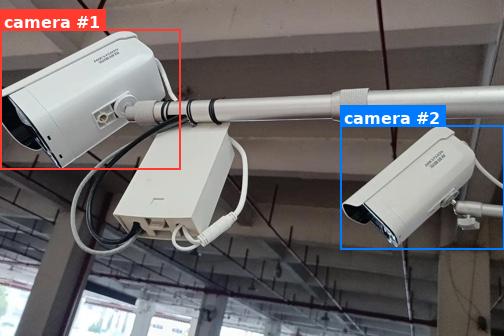
<ref>camera</ref><box><0><89><357><505></box><box><675><372><999><742></box><|im_end|>
#################################################- 根据模型输出的结果,运行如下示例代码,即可定位到图片中指定物品:
#!/usr/bin/env python3
# -*- coding: utf-8 -*-
"""
Draw bounding boxes returned by LocateAnything on the source image.

Box format (Qwen-VL style, normalized to 0-999):
    <ref>camera</ref><box><x1><y1><x2><y2></box><box><x1><y1><x2><y2></box>...
"""

import re
import sys
from pathlib import Path

try:
    from PIL import Image, ImageDraw, ImageFont
except ImportError:
    print("Pillow is required. Install with: pip install pillow", file=sys.stderr)
    sys.exit(1)


# ---- 1. Parse the model output -------------------------------------------------
def parse_ref_boxes(text: str):
    """
    Return a list of (label, [(x1, y1, x2, y2), ...]) tuples.
    Coordinates are kept in the original 0-999 normalized scale.
    """
    pattern = re.compile(
        r"<ref>(?P<label>[^<]+)</ref>"                           # label
        r"(?P<boxes>(?:<box><\d+><\d+><\d+><\d+></box>)+)"      # 1+ boxes; each value is wrapped in <>
    )
    box_re = re.compile(r"<box><(\d+)><(\d+)><(\d+)><(\d+)></box>")

    results = []
    for m in pattern.finditer(text):
        label = m.group("label").strip()
        boxes = [
            (int(b.group(1)), int(b.group(2)),
             int(b.group(3)), int(b.group(4)))
            for b in box_re.finditer(m.group("boxes"))
        ]
        results.append((label, boxes))
    return results


# ---- 2. Convert normalized coords -> pixel coords ------------------------------
def to_pixel(box, img_w, img_h, norm=999):
    x1, y1, x2, y2 = box
    return (
        int(x1 / norm * img_w),
        int(y1 / norm * img_h),
        int(x2 / norm * img_w),
        int(y2 / norm * img_h),
    )


# ---- 3. Draw ------------------------------------------------------------------
def draw_results(image_path, model_output, output_path, norm=999):
    img = Image.open(image_path).convert("RGB")
    draw = ImageDraw.Draw(img)
    W, H = img.size
    print(f"[info] image size: {W}x{H}")

    # try a TTF font; fall back to default
    try:
        font = ImageFont.truetype("/usr/share/fonts/truetype/dejavu/DejaVuSans-Bold.ttf",
                                  size=max(14, W // 30))
    except Exception:
        font = ImageFont.load_default()

    palette = ["#FF3B30", "#007AFF", "#34C759", "#FFCC00",
               "#AF52DE", "#FF9500", "#5AC8FA", "#FF2D55"]
    color_idx = 0

    parsed = parse_ref_boxes(model_output)
    if not parsed:
        print("[warn] no <ref>/<box> pair found in input text.", file=sys.stderr)

    for label, boxes in parsed:
        for i, box in enumerate(boxes):
            color = palette[color_idx % len(palette)]
            color_idx += 1
            px = to_pixel(box, W, H, norm)
            print(f"[box] '{label}' #{i+1} norm={box}  pixel={px}")

            # rectangle (outline)
            draw.rectangle(px, outline=color, width=max(2, W // 250))

            # label background + text
            tag = label if len(boxes) == 1 else f"{label} #{i+1}"
            tb = draw.textbbox((0, 0), tag, font=font)
            tw, th = tb[2] - tb[0], tb[3] - tb[1]
            pad = 4
            tx0, ty0 = px[0], max(0, px[1] - th - 2 * pad)
            tx1, ty1 = tx0 + tw + 2 * pad, ty0 + th + 2 * pad
            # if label would go above the image, place it just below the box
            if ty0 == 0 and px[1] - th - 2 * pad < 0:
                ty0, ty1 = px[1] + 2, px[1] + 2 + th + 2 * pad
            draw.rectangle([tx0, ty0, tx1, ty1], fill=color)
            draw.text((tx0 + pad, ty0 + pad), tag, fill="white", font=font)

    img.save(output_path)
    print(f"[ok] saved result to: {output_path}")


# ---- 4. Main ------------------------------------------------------------------
if __name__ == "__main__":
    # You can also pass the model text as argv[1] if you don't want to edit the script.
    model_output = (
        "<ref>camera</ref><box><0><89><357><505></box><box><675><372><999><742></box>"
    )
    if len(sys.argv) >= 2:
        model_output = sys.argv[1]

    image_path  = "demo512x342.jpeg"
    output_path = "demo512x342_result.jpeg"

draw_results(image_path, model_output, output_path)- 结果图预览: